Showing posts with label sqwishland costumes. Show all posts
Thursday, January 12, 2012
Where are the items that I bought?
Shopping in SqwishLand is easy as pie! Unlike in the real world, you don't need to carry the stuff you bought back to your house. When you buy items in the Sqwop, they go straight to your Inventory. Let me show you how to find and use the items you just bought:
Decorating your SqwishHome with Furniture
1. Click the Edit Room icon located at the bottom left of your game screen.
2. You will see the Edit Room toolbar. To see the furniture that you bought, click the Storage icon.
3. Click the specific furniture that you want to use.
4. Once the furniture is in the room, use the Edit Room toolbar icons to modify its position.
Dressing up your Avatar
1. In your SqwishHome front yard, click the Inventory icon in the game panel.
2. Select the features that you want for your Avatar: Head, Body and Legs. Don't forget to hit SAVE when you're done.
Happy decorating and have fun dressing up!
-SqwishyJoey
virtual pets
Tuesday, October 25, 2011
What Will You Be This SqwishLand Halloween?
Halloween is just around the corner and I can’t wait. It’s one of my favorite holidays every year—next to Christmas of course. What makes me even more excited is the fact that SqwishLand throws one of the best Halloween virtual celebrations. Have you seen the Halloween-themed world? I love it! I also had fun playing the Ghostly Sqworca puzzle and riddle. How did you guys do in that special minigame? I hope you also won and didn't get lost in time.
Another thing I love about Halloween is the costumes. What will your avatar be in this year's Halloween trick-or-treat in SqwishLand? There are loads of avatar costumes that you can choose from in the Sqwop. Let me show you some of the cool costumes that you can dress up your avatar with.


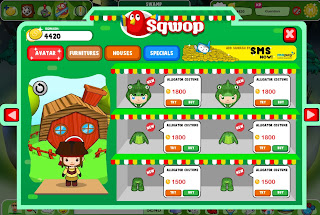
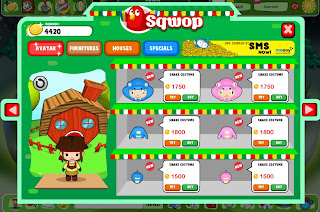
There are 2 cool new avatar costumes, Alligator and Snake, which you can only buy at the Sqwop in the Swamp. The Swamp can only be accessed by players who have reached level 31, so these costumes are exclusive and you can be sure that only a few of you will be dressed up in them.
Go ahead and give them a try. You'll surely look Swamp-tastic this Halloween with these costumes. You can also use them in the Suit Up game events to win some game event points. Happy Halloween fellow SqwishLand fans!
-SqwishyJoey
Virtual Pets
Tuesday, October 18, 2011
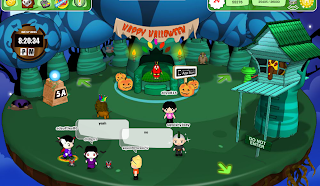
It's Halloween in SqwishLand!
Hi guys! Have you visited SqwishLand lately? If you haven’t yet, go ahead and take a peek. SqwishLand turned into a dark Halloween-themed place over the weekend. But don’t worry, it still packs in a lot of cuteness!

Along with SqwishLand’s makeover, MODJirah's giving away cool Halloween-themed avatar costumes. So if I were you, I'd do my best to join and win those game events.
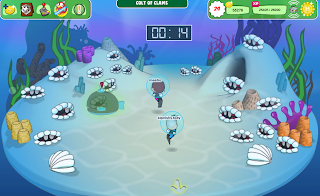
My favorite Halloween treat from SqwishLand this year is the minigame for the Ghostly Sqworca. You'll find him swimming in the Colt of Clams. Just make sure that you have a scuba gear so you can swim down there and play the minigame.

I'm not gonna tell you what will happen when you click on the Ghostly Sqworca, so you’ll have to go and discover it yourself. Have fun!
-SqwishyJoey
Virtual Pets
Friday, September 23, 2011
How to Customize Your SqwishLand Profile Page
One of the fun features of the new SqwishLaunch Pad is the Profile Page for SqwishLand players. On this page, you can share fun facts about you with your SqwishLand Buddies. I'll teach you how you can customize your Profile Page in this tutorial.
1. This is how your Profile Page looks like. In the Favorites box, you will see the spaces where you can list your favorite music, TV shows, movies, etc. To fill these in, click the Edit button.
1. This box will appear.
2. For every category, there is a drop-down list where you can select a specific musician, TV show, movie, food, etc.
3. You can list a maximum of 3 items for each category.
4. When you're done, click the Save button.
5. That’s it! It’s simple and easy. Now your SqwishLand Buddies will see what cool stuff you're into.
What I really love about this is that I can see which of my SqwishLand Buddies share common interests with me. The choices are limited though, so I hope SqwishLand adds up more in the future.
-SqwishyJoey
Virtual Pets
Wednesday, August 3, 2011
Let’s Play Dress Up!
I really like changing my avatar’s look every now and then. Who doesn’t anyway? Yes it can get costly sometimes, but dressing my avatar up—especially during holidays like Easter and Christmas—can be really fun. There are also games organized by the mods that require players to wear specific costumes to be able to join. So for today, I’ll be showing you how to buy costumes for your avatar.
1. Find a Sqwop, and click Avatars.
2. A pop-up message will appear. Browse through the costumes until you decide which one you like.
3. I personally like hip hop music, so I think I’ll get this hip hop head. Click Try to see what it looks like on your avatar.
4. If you like it and you’d like to make the purchase, click Buy.
5. A pop-up message will confirm that you’ve successfully bought the item.
6. If you want to use your newly bought item, look at your Inventory.
7. You will see the item together with your other costumes.
That was really easy huh? Go ahead and experiment with your avatar’s style. Enjoy!
SqwishyJoey
Virtual Pets
Subscribe to:
Posts (Atom)