Showing posts with label sqwishland character effects. Show all posts
Thursday, January 12, 2012
Where are the items that I bought?
Shopping in SqwishLand is easy as pie! Unlike in the real world, you don't need to carry the stuff you bought back to your house. When you buy items in the Sqwop, they go straight to your Inventory. Let me show you how to find and use the items you just bought:
Decorating your SqwishHome with Furniture
1. Click the Edit Room icon located at the bottom left of your game screen.
2. You will see the Edit Room toolbar. To see the furniture that you bought, click the Storage icon.
3. Click the specific furniture that you want to use.
4. Once the furniture is in the room, use the Edit Room toolbar icons to modify its position.
Dressing up your Avatar
1. In your SqwishHome front yard, click the Inventory icon in the game panel.
2. Select the features that you want for your Avatar: Head, Body and Legs. Don't forget to hit SAVE when you're done.
Happy decorating and have fun dressing up!
-SqwishyJoey
virtual pets
Monday, November 14, 2011
How to put Character Effects in your SqwishLand Avatar
Did you notice the cool effects on the avatars of your SqwishLand buddies? You can also put the same effects on your avatar! Let me show you how:
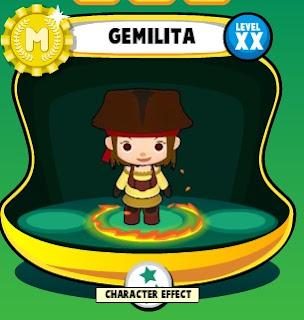
1. In your Profile page in the SqwishLaunch Pad, click the character effect icon under your avatar.
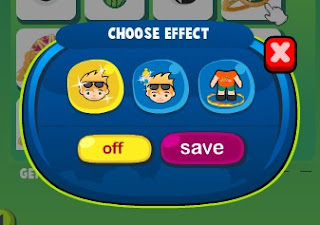
2. A pop-up message will show the character effects that you can activate. Some character effects can only be unlocked when you reach a specific level in the game. Choose and click a character effect, then hit SAVE to activate it.
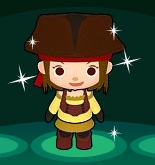
3. These are the three character effects you can use on your avatar. Looks Sqwishtastic!, don't you agree? Your avatar will surely look more animated with these character effects, so try them now!
'Til the next tutorial! This has been SqwishyJoey, your friendly SqwishLand tutorial maker. ;)
Virtual Pets
1. In your Profile page in the SqwishLaunch Pad, click the character effect icon under your avatar.

2. A pop-up message will show the character effects that you can activate. Some character effects can only be unlocked when you reach a specific level in the game. Choose and click a character effect, then hit SAVE to activate it.

3. These are the three character effects you can use on your avatar. Looks Sqwishtastic!, don't you agree? Your avatar will surely look more animated with these character effects, so try them now!


Virtual Pets
Subscribe to:
Posts (Atom)