Showing posts with label virtual pets game. Show all posts
Thursday, November 17, 2011
Your SqwishLand Pets Level Up Too!
When you play in SqwishLand.com, it's not only your avatar that levels up. Your SqwishLand pets level up too! When you first adopt a SqwishLand pet from the SqwishGallery, you will notice that your pet is small in size. As they level up, they get bigger and bigger. To level up your SqwishLand pet, select which virtual pet you would like to Walk. Your SqwishLand pet can level up to as high as level 10.
Just play more minigames with your SqwishLand pet and get yourself a Premium Membership to unlock all the game features in SqwishLand.
Have fun playing!
-SqwishyJoey
Tuesday, October 18, 2011
It's Halloween in SqwishLand!
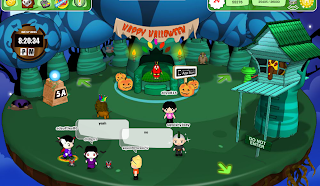
Hi guys! Have you visited SqwishLand lately? If you haven’t yet, go ahead and take a peek. SqwishLand turned into a dark Halloween-themed place over the weekend. But don’t worry, it still packs in a lot of cuteness!

Along with SqwishLand’s makeover, MODJirah's giving away cool Halloween-themed avatar costumes. So if I were you, I'd do my best to join and win those game events.
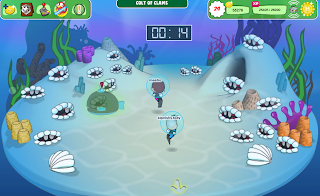
My favorite Halloween treat from SqwishLand this year is the minigame for the Ghostly Sqworca. You'll find him swimming in the Colt of Clams. Just make sure that you have a scuba gear so you can swim down there and play the minigame.

I'm not gonna tell you what will happen when you click on the Ghostly Sqworca, so you’ll have to go and discover it yourself. Have fun!
-SqwishyJoey
Virtual Pets
Thursday, October 13, 2011
How to Fish in the Sqwater Falls
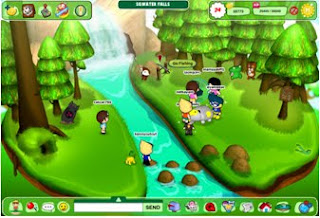
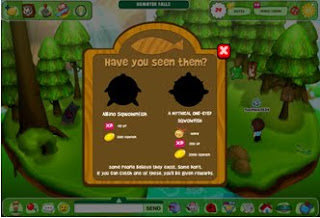
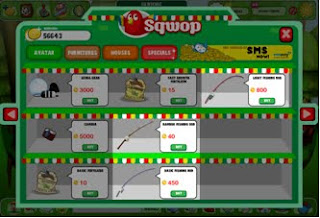
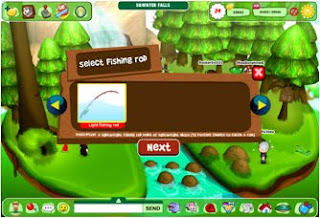
Have you visited the revamped Sqwater Falls recently? There's a new game where you can fish in the river by the falls. You can catch different prizes and rare SqwishLanders! But to play the game, you will need a fishing rod.


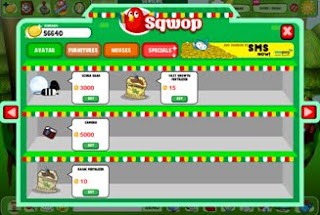
1. Visit a Sqwop. You can find three types of fishing rods under Specials. Each fishing rod has a different catching ability to catch items in the river.

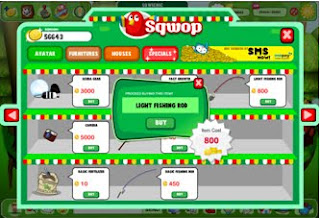
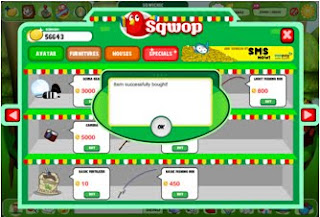
2. Select the fishing rod that you would like to purchase. I'm getting the Light Fishing Rod that costs 800 Sqwash. A pop-up will notify you that you have successfully bought your fishing rod.


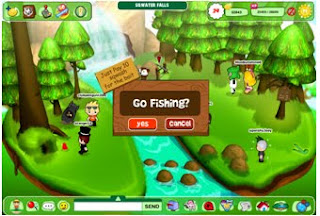
3. Now that you have your fishing rod, it's time to go fishing! Just click the fishing rod in the Sqwater Falls, select your fishing rod and you're good to go!


What's exciting about this game is that you'll never know what you're gonna get. So keep on trying and happy fishing!
-SqwishyJoey
Virtual Pets
Tuesday, October 4, 2011
How to Make Your SqwashPlant Grow Faster!
Do you take good care of your SqwashPlant? I do! It's one of the easiest ways to gain more Sqwash and I love watching it grow. Did you know that there's actually a way to make your SqwashPlant grow faster? Yes, there is! The happier your SqwashPlant is, the more Sqwash you can get from it. Let me tell you my secret.
See that fertilizer on the far right of the shelf? That's a Fast Growth Fertilizer!

You can buy a sack of Fast Growth Fertilizer at the Sqwop for 15 Sqwash.

Note: You need to at least be at Level 16 to purchase a Fast Growth Fertilizer.
When your plant asks for fertilizer, just drag and drop the Fast Growth Fertilizer into the plant. Hope my SqwishLand secret will help you guys out!
-SqwishyJoey
Virtual Pets
Friday, September 23, 2011
How to Customize Your SqwishLand Profile Page
One of the fun features of the new SqwishLaunch Pad is the Profile Page for SqwishLand players. On this page, you can share fun facts about you with your SqwishLand Buddies. I'll teach you how you can customize your Profile Page in this tutorial.
1. This is how your Profile Page looks like. In the Favorites box, you will see the spaces where you can list your favorite music, TV shows, movies, etc. To fill these in, click the Edit button.
1. This box will appear.
2. For every category, there is a drop-down list where you can select a specific musician, TV show, movie, food, etc.
3. You can list a maximum of 3 items for each category.
4. When you're done, click the Save button.
5. That’s it! It’s simple and easy. Now your SqwishLand Buddies will see what cool stuff you're into.
What I really love about this is that I can see which of my SqwishLand Buddies share common interests with me. The choices are limited though, so I hope SqwishLand adds up more in the future.
-SqwishyJoey
Virtual Pets
1. This is how your Profile Page looks like. In the Favorites box, you will see the spaces where you can list your favorite music, TV shows, movies, etc. To fill these in, click the Edit button.
1. This box will appear.
2. For every category, there is a drop-down list where you can select a specific musician, TV show, movie, food, etc.
3. You can list a maximum of 3 items for each category.
4. When you're done, click the Save button.
5. That’s it! It’s simple and easy. Now your SqwishLand Buddies will see what cool stuff you're into.
What I really love about this is that I can see which of my SqwishLand Buddies share common interests with me. The choices are limited though, so I hope SqwishLand adds up more in the future.
-SqwishyJoey
Virtual Pets
Sunday, September 11, 2011
How to send a postcard to your SqwishLand Buddies
Want to say hi or say thank you to a new SqwishLand Buddy for adding you? Easy. Just send a postcard! Here's how:
1. Click the Buddies icon.
2. A window will appear showing your Buddy List. Select the user name of the SqwishLand Buddy you want to send a postcard to. Click the Send Postcard button.
3. Select the postcard that you want to send. Click the BUY button.
4. All good? Click the SEND button.
5. You will be notified when your postcard has been sent successfully.
Go ahead and try it, I'm sure your SqwishLand Buddies would love to receive a postcard from you.
-SqwishyJoey
Virtual Pets
1. Click the Buddies icon.
2. A window will appear showing your Buddy List. Select the user name of the SqwishLand Buddy you want to send a postcard to. Click the Send Postcard button.
3. Select the postcard that you want to send. Click the BUY button.
4. All good? Click the SEND button.
5. You will be notified when your postcard has been sent successfully.
Go ahead and try it, I'm sure your SqwishLand Buddies would love to receive a postcard from you.
-SqwishyJoey
Virtual Pets
Tuesday, September 6, 2011
How to Feed SqwishLand Pets
Just like live pets, your SqwishLand pets get hungry too! You need to feed them and make sure that their Health levels are not low, so they will have the energy to play with you in the minigames. So for today, I’ll show you how you can feed your SqwishLand pets.
1. In your SqwishHome, click a SqwishLand pet.
2. A box will appear showing your pet’s levels. Click the FEED button.
3. On the left side of your game screen, a box will appear showing your food storage. Select the food you want to feed your SqwishLand pet.
4. You’ll see that your pet’s Health level increases as you feed it.
5. To buy food, go to a Sqwop and click Sqwishy Food.
6. Select a Sqwishy food and click the BUY button. Your purchase will instantly be added to your inventory of food for your pets’ next feeding session.
Remember, always keep your pets healthy!
-SqwishyJoey
Virtual Pets
Thursday, August 25, 2011
New Way to Manage Your SqwishLand Buddies
Hi fellow SqwishLand fans! SqwishLand has a new Buddy management feature. It’s quite cool actually! Let me show you how to use it.
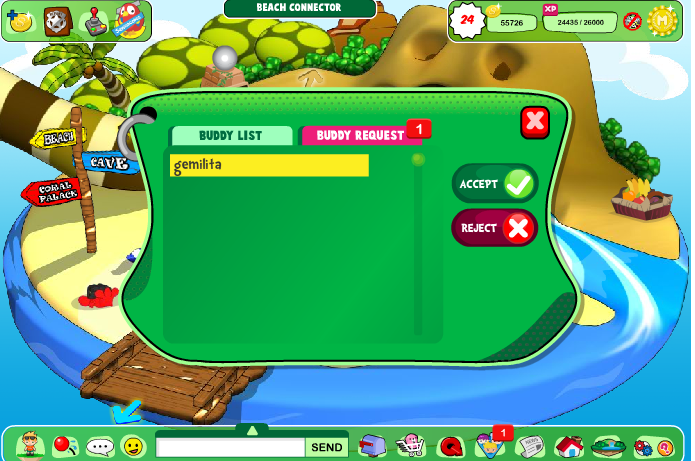
- The Buddies icon now has notifications when you have a pending Buddy request.
- User names of the SqwishLand players requesting to be added as your buddy will appear under the Buddy Request tab. Select a user name and click Accept or Reject.
- You will see all your buddies under the Buddy List tab. You will also know if your buddy is online or offline. By selecting a user name, you can choose to do any of the following: Send Postcard, Visit House, Search Buddy (know the current location of their SqwishLand avatar), and Remove Buddy.
Note: The Visit House and Search Buddy functions only work when your buddy is online. 
I told you this new buddy feature’s cool!
Oh, before I forget, you’ll notice that your old buddies are not in the list. SqwishLand reset the buddy lists so you’ll just have to add them up again when you’re online.
SqwishyJoey
Wednesday, August 17, 2011
How to join the Mighty Feathers Mighty Battle
Every two weeks, SqwishLand picks a minigame for the Mighty Feathers Mighty Battle. Whoever gets the top 3 highest scores by the end of the battle will win lots of Sqwash. Joining is easy, here’s how:
1. Log in to SqwishLand.com. Upon entering the virtual world, you will instantly see an icon in the room. The icon depends on which minigame is chosen as the Mighty Feathers Mighty Battle. In this screenshot, there’s a fruit basket located at the back of the barn museum because the current minigame is Lala Food Fight.
2. Click on the fruit basket. You’ll see a pop-up window like this.
3. Click PLAY NOW. Enjoy the game and try to get the highest possible score!
4. If you played really well, you can be one of the top 3 highest scorers who will win lots of Sqwash!
Best of luck, guys! That easy SqwishLand tutorial was brought to you by SqwishyJoey!
Virtual Pets
Wednesday, July 27, 2011
Getting to know Sqwishland Players
Hey, I’m back. How have you been guys? Well, I just wanted to share a new Sqwishland feature I discovered the other day. There’s now an easier way to get to know other Sqwishland players and add them up as your buddies.
1. Click on a Sqwishland character. These options will pop up:

2. Then, click on Info to know more about the character.

3. You can also check out their SqwishHomes by clicking on the Visit Home.

4. If you want to add them up as a buddy, click Add Buddy
I really love how Sqwishland is making things even easier for everyone to interact and meet other players in the game. I’d love to have you as my buddy too. So next time you see my avatar, don’t hesitate to add me as a buddy or visit my SqwishHome.
See you online!
SqwishyJoey
Virtual Pets
Tuesday, July 19, 2011
How to Enter a SqwishCode
Hi guys! I’m back! For today, I’ll be giving you a tutorial on how to enter a SqwishCode in the online game, Sqwishland.com. It’s simple really, just follow everything that I say.
1. When you buy a Sqwishland toy capsule, you’ll see the SqwishCode inside with the cute Sqwishland pencil topper. The SqwishCode is a strip of paper with a 14-digit code. If you don’t see a SqwishCode inside the capsule, you’ve been ripped off because that probably isn’t a Sqwishland toy!
2. Login to Sqwishland.com. When you’ve logged in, look for this icon and click on it.
3. This window will pop-up. Enter the SqwishCode. Review the SqwishCode that you’ve entered before hitting the Enter button.
4. When you have successfully entered a SqwishCode, this window will appear. Now you can buy a new Sqwishlander. Just click the OK button.
See, that was really easy, don’t you think? I’ll be back with more tutorials next time so stay tuned! ;)
SqwishyJoey
Virtual Pets
Thursday, June 30, 2011
Sqwishland Pet Moods
Have you guys noticed the moods that Sqwishlander pets show when they’re hungry or tired? In the Sqwishland 2.0, your Sqwishlander pets’ needs are just like your real pet’s needs. You need to feed them and make them happy so you can play with them in the minigames.
Notice that my Sqweep doesn’t show any mood, but the other 3 Sqwishlanders have angry moods. When your pet shows a mood just like that, check their Health, Energy, and Mood. They’re probably hungry or tired.
Here’s what Squizel, the official Sqwishland tour guide has to say:
Your pet is too tired. Replenish its health by feeding it. You can buy some Sqwishy food from the picnic area.
Some basic facts about your pet Sqwishlander:
- Everytime your pet levels up, they will grow in size and will get more pet XP
- If your pet’s energy drops down to less than 10, they will be too tired to play so make sure you feed them regularly.
- The mood bar indicates how happy your pet is. Higher mood level means more pet experience per game played.
Happy playing friends!
- SqwishyJoey
Virtual Pets
Wednesday, June 15, 2011
How to Shop at the Sqwop
I love shopping at Sqwishland's Sqwop. They've got a lot of cool items for my avatar and SqwishHome. If you still don't know how to shop at the Sqwop, here's a quick and easy guide that I made to help you out:
1. Sqwishland has 3 Sqwops. Choose from the Sqwop located at the Mayan Temple, Sqwicnic, or at the Coral Palace Market.
2. Click on the Sqwop and a window will appear. Choose from the Avatar, Furniture, House, or Special Items tab. I chose the Avatar tab to but a new top for my Avatar.
3. Once you've chose which item to buy, click on the Try button to see how it looks on your Av
4. When you're happy with the item, click on the Buy button. A window will pop up, click Buy.
5. Another window will up up confirming that you've successfully bought the item.
6. To check or use the item you just bought, go to your SqwishHome. Click on the Inventory icon at the lower part of your screen.
7. A window will pop up. Click on the tab where your item is categorized. I clicked on the Body tab because I bought a top. To use the item, select it and click Save.
Happy shopping at the Sqwop!
SqwishyJoey
Virtual Pets
Subscribe to:
Posts (Atom)