Showing posts with label sqwishland cheats. Show all posts

Tuesday, October 4, 2011

How to Make Your SqwashPlant Grow Faster!

Do you take good care of your SqwashPlant? I do! It's one of the easiest ways to gain more Sqwash and I love watching it grow. Did you know that there's actually a way to make your SqwashPlant grow faster? Yes, there is! The happier your SqwashPlant is, the more Sqwash you can get from it. Let me tell you my secret.

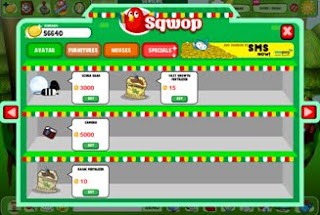
See that fertilizer on the far right of the shelf? That's a Fast Growth Fertilizer!

Fast Growth Fertilizer

You can buy a sack of Fast Growth Fertilizer at the Sqwop for 15 Sqwash.

Purchase A Fast Growth Fertilizer

Note: You need to at least be at Level 16 to purchase a Fast Growth Fertilizer.

When your plant asks for fertilizer, just drag and drop the Fast Growth Fertilizer into the plant. Hope my SqwishLand secret will help you guys out!

-SqwishyJoey

Virtual Pets

Friday, September 23, 2011

How to Customize Your SqwishLand Profile Page

One of the fun features of the new SqwishLaunch Pad is the Profile Page for SqwishLand players. On this page, you can share fun facts about you with your SqwishLand Buddies. I'll teach you how you can customize your Profile Page in this tutorial.

1. This is how your Profile Page looks like. In the Favorites box, you will see the spaces where you can list your favorite music, TV shows, movies, etc. To fill these in, click the Edit button.

1. This box will appear.


2. For every category, there is a drop-down list where you can select a specific musician, TV show, movie, food, etc.


3. You can list a maximum of 3 items for each category.


4. When you're done, click the Save button.


5. That’s it! It’s simple and easy. Now your SqwishLand Buddies will see what cool stuff you're into.


What I really love about this is that I can see which of my SqwishLand Buddies share common interests with me. The choices are limited though, so I hope SqwishLand adds up more in the future.

-SqwishyJoey

Virtual Pets  

Monday, August 15, 2011

Pet SqwishLanders Level Up Too!

When you play in SqwishLand, it’s not just your avatar that gains XP points and levels up. Your SqwishLand pets do too! Let me show you how this happens and how you can check what their levels are:
 
1. Once you own a number of SqwishLand pets, you will have the option of which pet to walk with. The pet you you choose will gain XP points and level up with your avatar.


2. To check your pet’s level stat, select the pet and click Walk. Then click your avatar from the Character Panel. I’ve selected the Sqwig.


3. On the left side of the Info tab, you will see your pet’s statistic. Here you can see that the pet Sqwig is at Level 1 and has XP points of 28/50. Once its XP points reach 50/50, it will level up.

4. Your pet can only gain XP points and level up if you select it as a pet and play minigames with it.
There you have it, a guide on how your SqwishLanders level up. So keep playing and earning those points!

See you online!
SqwishyJoey
 
Virtual Pets  

Thursday, August 11, 2011

How to Use the SqwishLand Panel Part 2

6. Sqwishcard. Here you can see your virtual emails from your buddies.


7. SqwishLand Gallery. If you want to get a new SqwishLand pet or just see the huge collection of SqwishLanders, click this icon.


8. Quest. Take on quests to win special items and earn Sqwash and XP points. Going on quests also allows you to earn more about SqwishLand.


9. Buddies. Click this icon to view and manage your list of SqwishLand buddies.


10. News. The SqwishTimes is SqwishLand’s official newspaper. If you want to know the latest news on SqwishLand, click the icon and read up!


11. Inventory. Click this to view and manage the items that you already bought.


12. SqwishMap. Use the SqwishMap to find your way around the virtual world of SqwishLand.

That was really easy, right? The SqwishLand panel comes in really handy whenever you play, so it’s best that you know how to use it.

See you online!


SqwishyJoey
Virtual Pets  

Tuesday, August 9, 2011

How to Use the SqwishLand Panel


Hi guys! For this week’s tutorial, I’ll show you how to use the SqwishLand panel. But wait. You might be wondering, “What’s the SqwishLand panel?” It’s the row of icons at the bottom of your game screen that you can use to do a lot of fun things.


1. Let’s start from the left. First is the Actions icon. 


These are things that your avatar can do, like the Wave.


2. Next is the Throw icon. You can throw things like water balloons. Just use your mouse to choose a target.


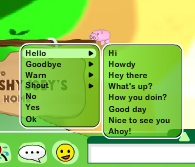
3. Then we have the Quick Chat icon. You can choose from a list of ready-to-use words and phrases when chatting with other SqwishLand players. 


4. Emoticons. These are cute smileys or symbols that you can use to express yourself when chatting with your buddies.


5. Chat box. Just type in anything that you want to say in the empty box. You can use this when you want to have longer conversations with other players.
To be continued..
SqwishyJoey

Virtual Pets  

Thursday, June 23, 2011

Game of the Moment Challenge

Every two weeks, Sqwishland announces a Game of the Moment. A minigame is chosen and whoever gets the highest score will win Sqwash. So I took on the challenge and played this week's Game of the Moment: Sqwabble Rush.

The objective of the game is to shoot the approaching Sqwabbles with the help of a Sqwabble detector.

I couldn't take a screencap while playing the game because I was panicking, LOL. Those Sqwabbles approached slow at first but as I progressed to next levels, they got faster!


In the end, challenge failed. I only got a score of 628. :/ Oh well, at least I tried. That game was hard, but it was FUN!


And I got XP points and Sqwash, so I didn't really lose.


Have you guys seen the highest scorers so far? They're AMAZING. They're like Sqwabble Rush masters.

Have fun playing and goodluck!

SqwishyJoey

Virtual Pets  

Tuesday, June 7, 2011

Sqwishland 2.0 is here!

When I logged in to Sqwishland the other day, I was surprised to see this guy:

Turns out, this player tutorial is one of the newly added features for the launch of Sqwishland 2.0. Squizel was really cute, specially when he started to walk forward and wave his hand.

Squizel taught me the basic tasks in Sqwishland, like walking my avatar from one place to another.


Whenever I successfully do each task that Squizel taught, I leveled up, got bonus Sqwash and earned items like the SqwishMap.


Also, the SqwishMap now has hidden areas! Which means that I will only gain access to some areas when I level up. It's so exciting! My playtime in Sqwishland will be more challenging, I love it!


I was even given a free item from the Sqwop. I chose to get the Cave TV, it looked really cool. If only I can get something like that for my room in the real world too, hmmmm.


That was a really cute and easy tutorial by Squizel. Just by finishing the tutorial, I instantly got to level 4 and got bonus Sqwash. So if I were you, don't skip it, okay?


What level are you guys in now? :)

SqwishyJoey

Virtual Pets  

Thursday, May 26, 2011

Sqwash Plant

Sqwishland version of a Plant!

In your house, you are entitled to one plant! I don’t know how big this plant will grow, it just requires me to water it every once in a while, make sure the sun shines on it and fertilize it. I think it gives me sqwash too! I will update you guys if my plant grows bigger and if it’ll bear fruits!

Til the next adventure!

sqwishyJoey


Virtual Pets 

Friday, May 13, 2011

Mighty Feather’s Snack

Hello friends!!
Remember the quest I haven’t finished? Well, I’ve got some boasting to do because after roaming around Sqwishland, chatting with other players (oh yes, they’ve got a chat feature too!), and exploring each area in the game, finally, I was able to figure my way out of my first quest!
How did I ever have the quest in the first place? I just got curious with the little question mark on top of the Sqwion’s head and voila! When I clicked him, a message popped out saying that he’s got something for me to do.
The quest basically just wants me to play a mini game, Sqwabab. The following images are screencaps from the game.

It’s just easy because it gives you directions on how to play the game
 
 
After skewing fruits and leaves, I got what the quest asks of me, food for Mr. Mighty Feathers! It’s that easy! Well the game basically gives you patterns that you’re supposed to follow and of course, there’s a time limit. It also gives you 10 lives I think and as you advance, the number of fruits to skew double and the time becomes shorter. It gets addicting as well because you get challenged if you aren’t able to finish a certain pattern! The higher level you get, the higher amount of Sqwash you win! Sqwashes are kind of Sqwishland’s version of Money. It’s what players use to buy costumes for their characters, food for their Squishies, appliances and furnitures for your home and much more. As of now, I get Sqwashes from playing different mini games but I stumbled upon something that says I can also buy additional Sqwashes. Will probably explore that soon

Back to the quest. When you’re doing a quest, once you get a task done, a message pops out telling you what to do next. I got confused the last time because I was too excited, I didn’t read the messages. But even if you forget, there’s a toolbar below the screen that looks like this: 
 
The red Q tells all about your quests, those that you finished or quests that you are about to do It looks like the next picture: 
 
So I brought the food back to Mighty Feathers, the Sqwarrot in the Sqwungle and he’s grateful to me! Seems like he hasn’t eaten in weeks! Haha!


This is what I was talking about earlier, winning Sqwashes! As of the moment, I’ve got 12,608 Sqwash! I’m filthy rich! At least in Sqwishland
‘till the next adventure!!


Wednesday, May 11, 2011

My very first Squishy!


I’m so psyched! I got my very own Squishy! I got the Sqworse. When I was choosing in the Sqwishland Gallery, I was looking for a dog but they didn’t have one. So I figured the next best pet might be a horse! A pet and a ride in one. I honestly thought I could ride ‘em
 
Oh and I am about to finish my first quest! Will write about it soon!!

Thanks!

Monday, May 9, 2011

SqwishyJoey gots some Sqwuest!

Hey guys! 
 
Today, I happen to stumble upon the lion while exploring the Sqwungle. He gave me a task! It is kinda fun cause you know, I have something to do aside from just roaming around Sqwishland. Sqwion the lion gave me a quest and maybe when I finish the task, I get to win something!


It’s him right there wearing a crown and that’s me with the shades on my head another good thing about Sqwishland is that it allows you to choose whatever you want to wear. Other gamers are online too and you get to be friends with them as well. Awesome game, ain’t it? Another thing, the Sqwarrot, when you click him, he provides you with interesting facts! Learning and playing at the same time. Momma surely gonna love this!

Now the quest asks me to go to this Sqwicnic Area of the map. It’s just beside the Sqwungle and it’s easy to find other locations too because when you put your mouse over the arrows right there, it shows you the name of the place it’s heading to. So I headed to the Sqwicnic Area but as of now I don’t know what to do I’m really a noob at this…

While I still don’t know what to do, I’ll probably play some mini games. There’s this game of the moment called the Hip Sqwabbler. Sqwishland offers contests to their players too! If you win, you get to have prizes, I think it’s either Sqwash or items you can use in Sqwishland. I haven’t won anything yet because I just started playing but maybe soon I’ll share my adventures in winning something! 


I’ll concentrate on playing this Hip Sqwabbler first and maybe after I’ll share with you guys how this game works so you can try it yourself. And if I happen to figure out how to do my quest, I’ll share it with you guys for sure as well!
‘Til the next adventure!


Virtual Pets